Domain Property
A property in Google Search Console with aggregated data and reporting.
For example: uxseo.com
All crawl errors, search performance, and other metrics from individual (AKA URL Prefix) properties like below are totaled up and reported at sitewide domain level.
| HTTPS | https://uxseo.com |
| non-HTTPS | http://uxseo.com |
| Naked sub-domain | https://uxseo.com |
| Sub-domain | https://www.uxseo.com |
| Sub-folder | https://uxseo.com/gsc/ |
Domain properties require DNS verification, which can make it a pain in enterprise companies to set up.
Domain property reports are particularly helpful in:
- Finding unexpected loose lower-level testing and staging environments getting indexed in Google
- Strategizing website migrations such as MDOT migrations, https migrations, and website re-designs and re-platforming
- Gaining better holistic awareness of site speed, rich results, and crawl errors
URL Prefix (Individual Property)
A property in Google Search Console that strictly looks at a specific sub-domain and protocol (http or https). For example, https://uxseo.com
| HTTPS | https://uxseo.com |
| non-HTTPS | http://uxseo.com |
| Naked sub-domain | https://uxseo.com |
| Sub-domain | https://www.uxseo.com |
| Sub-folder | https://uxseo.com/gsc/ |
URL Prefix properties in GSC give you more granular data for single properties. You can set up multiple sub-domains and/or sub-folders to dissect your total website data and extract the most meaningful insights for all core sub-sites.
If you’re using the GSC dashboard interface, then you may run into row limitations when looking at domain properties.
For example, you might only see 100 product pages in the domain property Search Performance report, but in the sub-folder property under which product pages are nested, you can see your 1,000 product pages.
Overview
The Overview page is the primary landing page in Google Search Console upon login. It shows you high-level trends of your organic Search traffic, crawl errors, and structured data enhancements.
As of late 2021, Google began displaying basic Search Console Insights reports for creators, artisans, and small businesses who lack the SEO experience and expertise.
Search Console Insights
A report in Google Search Console with basic and high-level keyword and page statistics for business owners, creators, and webmasters who lack the SEO experience and savvy to deep dive into all the different GSC reports.
Performance
The best report in Google Search Console for analyzing trends, opportunities, and ideas.
The four key performance indicators (KPIs) in this dashboard are Impressions, Clicks, Click-through Rate, and Average Ranking Position. These can be viewed at a page level, folder level, sub-domain level, domain level, or custom filtering using RegEx.
You can analyze performance by pages, keywords (queries), devices, countries, types of search results, rich results, and more.
The Performance report previously only offered rolling 3-months data, however the new Google Search Console offers up to 16 months of data. (Why 16? Only Googlers know. Maybe it’s because 16 months = 69 fiscal weeks.)
16 months allows GSC users to compare the most recent 4-month year-over-year (YoY). 12 month views annualize search volume and traffic and help you find the top performers.
The Performance report still contains limitations, eg., 1,000 rows maximum in the GSC dashboard. To fetch tens of thousands of rows, leverage the Google Search Console API via 1) Search Analytics for (Google) Sheets add-on or 2) SEO Tools for Excel add-on.
Or you can build your own GSC API connection to fetch the data in Python, etc.
You can use Page level or Property level data from GSC and combine it with on-site Analytics data from Google Analytics, Adobe Analytics, etc. This will give you a holistic view of keyword impressions translating to search clicks, which converts to orders and revenue.
This data can be used to explain the state of SEO for your website or company, the growth opportunities, and the evolution of organic Search result pages.
Last Updated
A text label in the Performance Search Results report that explains when the most recent update was made to Impressions, Clicks, CTR, and ARP.
It tells you whether if the Most Recent Date data is partial or full. For example, if it’s 2:00 pm PST now, and Last Updated shows 12 hours ago, then Google refreshed the data at 02:00 am today, meaning all of yesterday’s data is final.
In the evenings, you see today’s date as the Most Recent date, which is obviously only partial data.
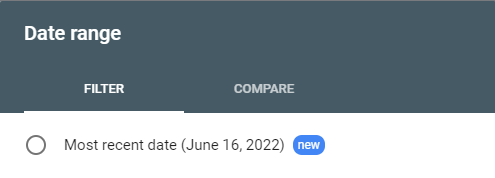
Per Google, all dates recorded and displayed in Pacific Time Zone (PT).
Search Type
A filtering option in the Search Performance Report that allows users to analyze, at least 4 known types of Google search results:
- Web: traditional blue links and certain rich results in organic results.
- Image: your images served under “All” results tab AND “Images” tab in the SERP.
- Video: videos appearing in video carousels and featured snippets in general results AND video placements under the “Videos” tab.
- News: your news articles appearing in Google News in the “All” results tab and “News” tab.

While Web results are the standard, certain types of websites, like News sites, can drive high traffic mix for all 4 types of search results, and possibly more.
By default, you see Web data trends, however you can also compare 2 search types against each other, and also compare a single search type between 2 date ranges.
Date Range
Google Search Console allows you to select and view Performance Search trended data for these default ranges:
- Most recent date
- Last 7 Days
- Last 28 Days
- Last 3 Months
- Last 6 Months
- Last 12 Months
- Last 16 Months
- Custom (up to 16 months)
GSC also allows you to do comparative analysis for these default ranges:
- Last 7 Days vs Previous 7 Days
- Last 28 Days vs Previous 28 Days
- Last 3 months vs Previous 3 months
- Last 7 Days vs Previous Year
- Last 28 Days vs Previous Year
- Last 3 months vs Previous Year
- Custom ranges
Tip: When comparing YoY, use Custom range to align the dates with the days of the week to get the most accurate view. For example, when comparing Wed 06/01/2022 – Tue 06/14/2022, set date range to Wed 06/02/2021 – Tue 06/15/2021. This is the best way to compare apples-to-apples.
Search Appearance
A tab in the Performance Search Results report that shows organic visibility trends of Rich Results (AKA rich snippets) in the SERPs.
Search Appearance results are mainly attributed, but not limited to, Schema / Structured data implementation. Common Search Appearance results include Products, Reviews, Recipes, How-To’s, Videos, FAQs, and more.
Google has also begun introducing engagement metrics such as Good Page Experience, which is a measure of fast-loading and mobile-friendly pages.
Good Page Experience
Sub-set of Rich Results which tells you how many clicks you received on pages in the “green” in Core Web Vitals, Secure HTTPS connection, and Mobile Usability (as of Jun 2022).
Good URLs are defined by Google as “Percentage of URLs with both Good status in Core Web Vitals and no mobile usability issues according to the Mobile Usability report, as of the last chart date.”
Web Light Results
Clicks, Impressions, CTR, and Average Ranking Position data for for users who were served Google Web Light results, which show only bare-bones content, like AMP pages, on slow internet connections (3g and slower).
Dates
A daily (dated) report of Search Results Performance data. Perfect for building your own internal rank tracking.
In the GSC dashboard, this data is almost useless. In Excel or Google Sheets, the visualizations are amazing.
See daily ranking trends for the entire domain or at individual property level or a specific section of the website or a handful of custom URLs or a single URL with thousands of associated queries.
You can filter by Rich Results, by Country, or by Device.
You can filter by types of Search Results such as Image, Web, News, Video, etc.
You can filter using RegEx commands to get super specific compartmentalization.
You can filter by Impressions or Clicks with a minimum requirement to gauge your highest performers. For example, you can use RegEx to define product page URLs, and then apply an additional filter to fetch only pages (or queries) Impressions (or Clicks) greater than 500.
You can add and refine dozens of combinations of daily rank tracking reports with endless query or page counts. You can literally track hundreds of thousands of keywords or pages on a daily basis using the truest and most valuable1st-party ranking data, aggregated and averaged for every Google search user in the world. No enterprise tool can ever come close to rank tracking as accurately, as granularly, or as powerfully as Google Search Console.
Pair with conversion analytics, namely Google Analytics, Adobe Analytics, etc., and you can get the most streamlined end-to-end customer journey analytics from Google search to order delivery.
FAQ Rich Results
A type of Rich Result in the Search Appearance tab that gives you Impressions and Clicks data from FAQ snippets in Google Search. FAQs, when FAQ Schema markup is applied, are extracted from your ranking webpage, and then displayed in Search Results to give users immediate answers to their problem (which reduces your CTR) or to give users a preview of the topics, themes, and sentiments of the page (which could reduce or increase your CTR).
For cost-benefit analysis of FAQ Rich Results, take the Impressions and Clicks of the primary ranking URL AND add Impressions and Clicks of the primary ranking URL’s FAQ Rich Results. Compare difference in Clicks and CTR between 2 pre-and-post date ranges.
Should you still mark up FAQs with FAQ Schema? Yes and no.
Yes, because the more information you continue sharing with Google in true structured data fashion, the more Google relies on your contributions in building their knowledge graph.
No, because the more Google relies on you, the more they are likely to engineer search results, where your website is no longer the destination; Google is.
The problem is if you don’t provide it, someone else will.
The best thing to do perhaps is to keep creating FAQ and other forms of Schema, because there is a war of schemas that is taking place already and this battlefield will only get more crowded as more players engage.
At the very least, there is great silver lining in knowing your FAQs, like good ads, are creating quality, memorable Impressions with thousands of users for free.
FAQ Rich results are excellent brand builders due to the nature of organic search.
Queries Containing
A control that filters every tab in the Performance Search Results report by a query (search term or phrase) containing and matching an exact string of characters. You can pattern-match use letters, numbers, or special characters like ‘?’ and ‘#’ and ‘/’ to spell the string.
| Control | Query | Page | Search Appearance | Device | Country | Dates |
| Queries containing | A list of queries (search terms) which include the exact string | A list of aggregated data by URLs, which were only shown in Google when user searched term containing string | Different types of Rich results that were generated when user searched term containing string | Mobile, desktop, tablet performance for all instances where user search term contained exact string | Visibility in Google Search worldwide results by Country, where user searched term containing exact string in English or in the local language | Daily rank tracking data aggregated by only queries containing exact string |
| Queries Not Containing | Same as above, but it inversely excludes the exact string | Same as above, but it inversely excludes the exact string | Same as above, but it inversely excludes the exact string | Same as above, but it inversely excludes the exact string | Same as above, but it inversely excludes the exact string | Same as above, but it inversely excludes the exact string |
| Exact Query | A single search term. What you put in is what you get. | All URL data per the same query | All Rich Results appearing per the same query | Same as above per the exact query | Performance by Country for same query | Daily rank tracking for single keyword |
| Queries Custom (RegEx) | Same as above, except this allows you to fetch a variety of URLs that match multiple containing or not containing patterns. This method of filtering uses Regular Expressions syntax. | Same as above, except this allows you to fetch a variety of URLs that match various patterns, performed by Regular Expressions syntax. | Same as above, except this allows you to fetch a variety of URLs that match various patterns, performed by Regular Expressions syntax. | Same as above, except this allows you to fetch a variety of URLs that match various patterns, performed by Regular Expressions syntax. | Same as above, except this allows you to fetch a variety of URLs that match various patterns, performed by Regular Expressions syntax. | Same as above, except this allows you to fetch a variety of URLs that match various patterns, performed by Regular Expressions syntax. |
| Control | Query | Page | Search Appearance | Device | Country | Dates |
| URLs containing | Get a list of user queries and their aggregated performance data for Page URLs containing a string of characters. Top keywords by Impressions and Clicks for all my product URLs | A list of aggregated data by Page URLs in Google Search containing the exact string entered Top Page URLs by Impressions and Clicks for my product URLs only. | Different types of Rich results that were generated when user searched term containing string Rich Results analysis by specific Page URLs. | Mobile, desktop, tablet performance for all instances where user search term contained exact string Mobile vs Desktop breakdown of specific properties, sections, or pages in a domain. | Visibility in Google Search worldwide results by Country, where user searched term containing exact string in English or in the local language | Daily rank tracking data aggregated by only queries containing exact string |
| URLs Not Containing | Same as above, but it inversely excludes the exact string | Same as above, but it inversely excludes the exact string | Same as above, but it inversely excludes the exact string | Same as above, but it inversely excludes the exact string | Same as above, but it inversely excludes the exact string | Same as above, but it inversely excludes the exact string |
| Exact URL | A single search term. What you put in is what you get. | All URL data per the same query | All Rich Results appearing per the same query | Same as above per the exact query | Performance by Country for same query | Daily rank tracking for single keyword |
| URL Custom RegEx) | Same as above, except this allows you to fetch a variety of URLs that match multiple containing or not containing patterns. This method of filtering uses Regular Expressions syntax. | Same as above, except this allows you to fetch a variety of URLs that match various patterns, performed by Regular Expressions syntax. | Same as above, except this allows you to fetch a variety of URLs that match various patterns, performed by Regular Expressions syntax. | Same as above, except this allows you to fetch a variety of URLs that match various patterns, performed by Regular Expressions syntax. | Same as above, except this allows you to fetch a variety of URLs that match various patterns, performed by Regular Expressions syntax. | Same as above, except this allows you to fetch a variety of URLs that match various patterns, performed by Regular Expressions syntax. |
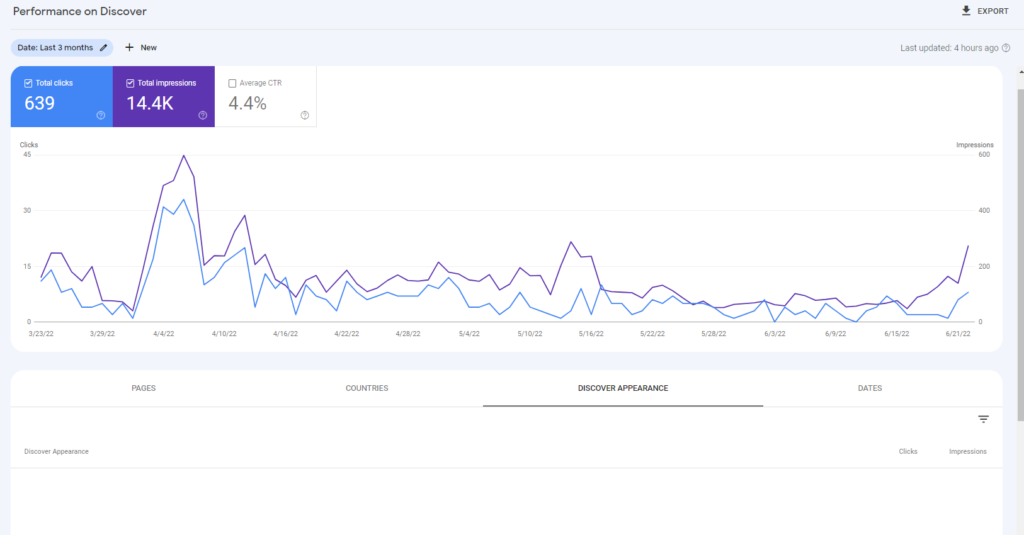
Discover Appearance
A report in Discover Performance dashboard which shows source of Google Discover Impressions and Clicks. Currently as of Jun 2022, no data is showing under S, so this is likely a new report in the works.
Coverage
All known pages
All submitted pages
Valid with Warnings
Excluded
Submitted URL not found (404)
Submitted URL marked ‘noindex’
Indexed, not submitted in Sitemap
Crawled – currently not indexed
Page with redirect
Not found (404)
Alternate page with proper canonical tag
Duplicate, submitted URL not selected as canonical
Discovered – currently not indexed
Sitemap index
Discovered URLs
Last Read
Removals
Temporary Removals:
Temporarily remove URL:
- Remove the page from Google Search Results for about 6 months after request approval date.
- Clear cached URL: Clear the cached version of the page and the snippet until the next time the page is indexed.
Outdated Content: History of all submitted requests for this property in the past 6 months using the public Remove Outdated Content tool.
Safesearch Filtering:
Experience
Page Experience
Good URLs: Percentage of URLs with both Good status in Core Web Vitals and no mobile usability issues according to the Mobile Usability report, as of the last chart date.
Total impressions of good URLs: The total number of Search impressions for URLs with a good page experience, over the time range shown by the chart.
Core Web Vitals: URLs with status Poor or Need improvement in the Core Web Vitals report are marked as Failing in the Page Experience report. URL status is calculated according to different time schedules in the two reports, so the Page Experience status might not reflect the current Core Web Vitals status for a given URL.
HTTPS: If a significant number of pages on your site use HTTP, you will see an HTTPS warning in the Page Experience report, although only HTTP pages on the site are affected.
Mobile Usability: URLs with mobile usability issues in the Mobile Usability report are marked as Failing in the Page Experience report. URL status is calculated according to different time schedules in the two reports, so the Page Experience status might not reflect the current Mobile Usability report status for a given URL.
Chrome UX Report: Data for the report comes from the Chrome User Experience Report. This reflects actual usage data on your site from users around the world.
LCP (largest contentful paint): How long it takes the page to render the largest visible element
FID (first input delay): How long it takes the page to start responding to user actions
CLS (cumulative layout shift): How much the page UI shifts during page loading.
Similar URLs: Each issue is assigned to a group of URLs that have similar content and resources. This is because it is assumed that any performance issues in these similar pages may be due to the same underlying problem (such as an overly large image, or a common slow-loading tab set display). The URL shown in the Examples table is one URL from the group. “Similar URLs” are other URLs in the affected group.
Agg LCP: Aggregate LCP is the time it takes for 75% of the visits to a URL in this group to reach LCP. LCP (largest contentful paint) is the time it takes for the browser to render the largest visible element in the viewport.
Text too small to read:
Content wider than screen:
Uses incompatible plugins:
Clickable elements too close together:
Enhancements:
Breadcrumbs
FAQ
Sitelinks Searchbox
Query
Page
Device
Country
Impressions
Clicks
Click-through Rate
Average Ranking Position
Average ranking position in the Google Search Console Performance Results report is the best rank tracking metric in SEO because Google gives you real-world rankings for every user search, every ranking page, every device, in every country, and more in an aggregated manner.
The only limitation is that when you aggregate average rankings at a macro level (all queries, all pages, all sub-domain properties, etc.), then the average number is low-signal.
The most useful and accurate way to look at average ranking positions for exact queries and exact URLs so that the overall average is not skewed too high or low.
For example, the average ranking position for a single keyword for 1-3 Page URLs in United States on Mobile is a high-signal ARP.
A better step to take — hopefully Google introduces this feature in the future — is to calculate a Weighted Average Ranking Position, based on Impressions or Clicks.
Sitemap
URL Inspection
View Crawled Page
Request Indexing
Test Live URL
View Tested Page
View Tested Page HTML
View Tested Page Screenshot
View Tested Page More Info
Page Resources
JavaScript Console Messages
Submitted and Indexed
Detected Items
Crawled as
Rendered with
Crawl Allowed?
Page Fetch
Indexing Allowed?
View HTTP response
Discovery
Sitemaps
Referring Page
Last Crawl
User-declared canonical
Google-selected canonical: The URL selected by Google as the authoritative version of this page. Other versions can be served in search results, depending on factors such as the user’s device type or language. This is not available in the live test, as Google selects a canonical URL only after a page is indexed.
Manual Actions
Security Issues
International Targeting
Ad Experience Report
Abusive Experiences
Abusive Notifications
External Links: Links from outside your property to your property.
Internal Links: Links from your property to your property
Top Linking Sites: Links from outside your property to your property. Values are trimmed to root domain and grouped. If the current property is listed here, it is because the subdomain of the host page has been omitted. For example, if the link is from www.example.com, the value shown here would be example.com.
Top Linking Text: Link text in external pages that link to your property.
Top Target Pages:
Top Linked Pages – Internal: Pages in your property linked from other pages in your property.
Top Linked Pages – External: Pages in your property linked from external pages.
Total Internal Links:
Total External Links: Total number of unique links to the current property from outside the property.
Linking Pages
Ownership Verification
Verification Methods
Domain Name Provider Verification
HTML File Verification
HTML Tag Verification
Google Analytics Verification
Google Tag Manager Verification
Permissions
Associations
Change of Address
Crawl Stats
Total Crawl Requests: Total number of crawl requests to your site, in the time span shown. Duplicate requests to the same URL are counted.
Total Download Size (bytes): Total size of all files and resources downloaded during crawling, during the period shown. If a resource is already cached from a previous crawl it is not counted. Bytes include file HTML, associated image bytes, script files, and CSS file.
Average Response Time (ms): Average page response time for a crawl request to retrieve the page content. Does not include retrieving page resources (scripts, images, and other linked or embedded content) or page rendering time.
Host status: Host status summarizes your general availability in the last 90 days. If any availability issues affected your site in the last 90 days or last week, you will see a warning.
Robots.txt fetch: robots.txt fetch describes whether Google had problems requesting your robots.txt file when crawling your site. An availability issue is when fetch request errors exceed a baseline number for a day. A successful fetch means that either the robots.txt file was successfully fetched (200), or that the file was not present (404); all other responses are considered a fetch error.
DNS Resolution: DNS resolution describes whether Google encountered DNS issues when crawling your site. DNS error rates are considered a problem if they exceed a baseline value for that day.
Server Connectivity: Server connectivity describes whether Google encountered connectivity issues when crawling your site. Connectivity error rates are considered a problem if they exceed a baseline value for that day.
By Response (Crawl Requests):
Not modified (304)
Moved permanently (301)
Server error (5xx)
By File Type (Crawl Requests):
By purpose (Crawl Requests):
Refresh
Discovery
By Googlebot type (Crawl Requests):
Page Resource Load (Googlebot Type):
Submit Feedback

Büyükşen Çerçioğlu porno ifşa araması konusunda kullanıcıların en çok ilgilendiği sonuçlar. 8869
larotid
larotid
Instant cash hits your account within minutes of completing each task, with no waiting periods, no minimums, and absolutely no hidden fees to worry about. 5366
morgidox
morgidox
doxycycline hyclate 100mg for sinus infection
doxycycline hyclate 100mg for sinus infection
Recep Tayyip Erdogan sex araması sonuçları arasında en popüler videolar, merak uyandıran başlıklar ve son eklenen içerikler yer alıyor. 2488
Turcas grubu porno ifşa aramasında dikkat çeken haberleri ve öne çıkan gelişmeleri tek sayfada bulabilirsiniz. 7377
tetracyclin
tetracyclin
diflucan 150 mg over the counter
diflucan 150 mg over the counter
vardenafil 20mg price
vardenafil 20mg price
vibramycin
vibramycin
Hikmet Çetin sex kaseti aramasında sonuçlar anlaşılır ve akıcı bir şekilde sunuluyor; aradığını bulmak çok kolay. 4401
Instagram takipçi satın al hizmetleriyle profiliniz dolgun ve etkileyici görünür; yeni paylaşımlarınız daha geniş kitlelere ulaşır, keşfet şansınız artar. 5831
Kolay para kazandıran mikro görevler ve günlük ödeme imkânlarıyla ekstra gelirini bugünden artırmaya başla. 8745
Hacklink satın alarak sitenizin domain otoritesini yükseltin. Google dostu backlinkler ile kalıcı ve güvenli sıralama elde edin. 8357
İlk sayfaya çıkmak artık hayal değil! Hacklink ile web sitenizi Google’ın radarına sokun ve tıklanma oranlarınızı artırın. 8878
Kaliteli hacklink satın al, dijital dünyada fark yarat. Yüksek otoriteli sitelerden alınan backlinkler ile sitenizi zirveye taşıyın. 2148
Hacklink satın al, markanı dijitalde büyüt. İçerik uyumlu, niche odaklı backlinkler ile hedef kitlenize doğrudan ulaşın. 9741
Hacklink panel sistemi ile backlinklerinizi izleyin ve yönetin. Detaylı istatistikler, kolay arayüz ve sürekli güncellenen link ağı. 1277
Hacklink panel avantajları ile tanışın. Toplu link ekleme, zamanlayıcı özelliği ve özelleştirilebilir kampanya seçenekleri. 3594
Hacklink hizmeti ile organik trafiğinizi artırın. Profesyonel SEO altyapısı, doğal link profili ve hızlı sonuçlar için doğru adrestesiniz. 8362
Hacklink paneli ile SEO stratejinizi güçlendirin. Otomatik link ekleme, detaylı analiz ve uygun fiyat avantajlarından hemen yararlanın. 3088
Etkili hacklink hizmeti ile SEO hedeflerinize ulaşın. Doğal backlink profili, yüksek kaliteli linkler ve profesyonel destek. 4345
Hacklink satın al, online görünürlüğünü artır. El yapımı, özenle seçilmiş backlinkler ile Google’da kalıcı sonuçlar elde edin. 5354
topical finasteride
topical finasteride
erythromycin eye ointment
erythromycin eye ointment
lisinopril 5 mg
lisinopril 5 mg
fluconazole for dogs
fluconazole for dogs
hello world
hello world